1 · Reading the request
Your sentence becomes a brief.
Before it searches, Scout reads your request the way a good scout would: what you’re looking for, where, when, what it must have, what you’d prefer, and what you don’t want. You write it the way you’d tell a friend — no filters or keywords.
- Looking for“a café to work from”
- The kind of place, and what you’ll do there. The kind of place is the anchor: Scout looks for that type, not something that merely looks similar.
- Location“Kyoto”
- The city or area you name. Results stay there.
- Timing“weekday mornings”
- When you plan to go, when it matters — light, crowds and opening times change through the day.
- Requirements“quiet, with outlets”
- What a place must have to count as a match.
- Preferences“good morning light”
- What would make one match better than another.
- Exclusions“no hotels, no rooftops”
- What you don’t want. A place listed as one is removed.
A follow-up like “quieter”, “cheaper” or “exclude rooftops” updates the same search instead of starting over, and keeps everything you already asked for.
2 · Requirements and preferences
Must-haves are held as must-haves.
The difference matters. A requirement narrows the search: when a place’s listing shows it doesn’t have it, the place is left out, however good it looks. When the listing doesn’t say, the place stays in and the requirement is flagged for you to check — never shown as met, and never counted against it. A preference only changes the order. An exclusion removes places listed as the thing you excluded.
Limits you state are checked against what a listing shows. If you ask for a stay under a certain price, Scout compares it with the price the listing gives; when no price is listed, it says so rather than assuming.
3 · Evaluating places
Each place is read for your need.
Scout looks places up in public place and map data — place listings and images from commercial map and search data, and open place data from OpenStreetMap, Wikidata and Wikimedia Commons — so results are real, named places you can look up. If Scout ever suggests a place it couldn’t confirm, it’s labelled as unverified and gets no map pin. Then it reads each one for what you said you need.
What “fits” depends on the request. For working, it’s quietness, seating, Wi-Fi, outlets and the best time to go. For a night out, atmosphere, noise and whether a group can book. For a shoot, light, access, permits and how crowds change through the day. The same café can be a good fit for one request and a poor one for another.
4 · Ranking and fit
Ranked by how well it fits — not by how popular it is.
- A place that meets what you asked for ranks above a near-miss, and a near-miss is never labelled a match.
- Among real matches, your preferences decide the order.
- Labels like “Best overall” or “Strong fit” appear only when a place clearly earns them on what you asked for.
- Every result says why it fits, in terms of your request — not a generic description of the place.
5 · Place briefs
Every result opens into a brief.
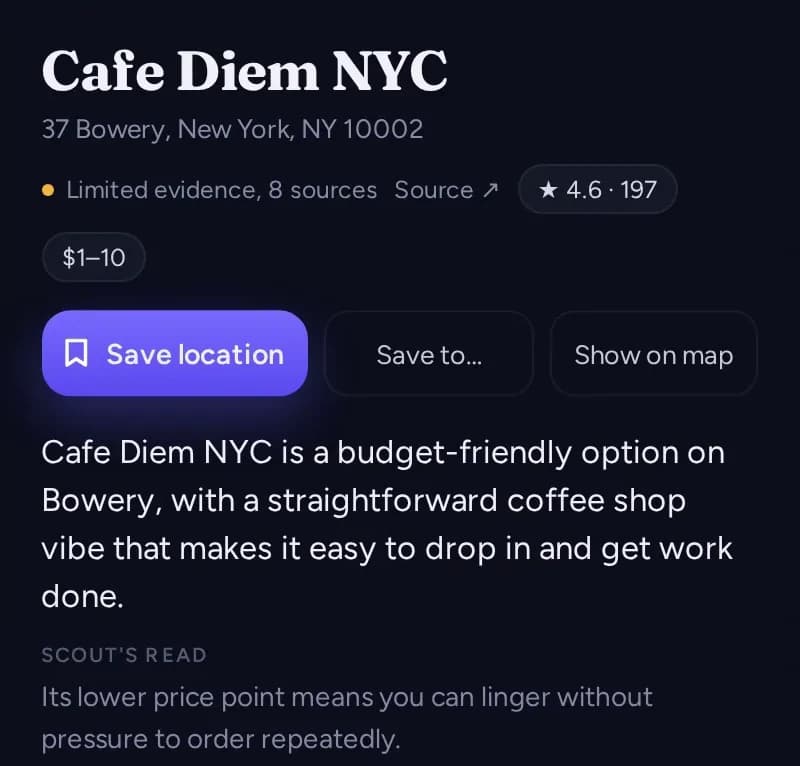
Open any result and you get its brief: why it fits what you asked for, what it’s like, the practical details for your plan, and what still needs confirming. From the brief, one tap saves the place or shows it on the map.
6 · Evidence labels
See how sure Scout is.
Scout keeps three things apart: what a source establishes, what Scout infers from it, and what nobody has confirmed. When a result’s evidence is thin, its card says so — “Limited evidence” or “Needs verification”. Open a place and its details are marked Verified, Supported or Inferred — or Unknown where nothing settles it. These are the labels you’ll see:
A reliable source confirms it.
Evidence backs it, but no source settles it outright.
Scout’s judgment from what it found — useful, not a fact.
Scout couldn’t confirm it. Check before you rely on it.
A judgment is never shown as a fact. A guessed permit status shown as a green light would be a promise Scout can’t keep — so it’s labelled for what it is.
7 · Short lists
Why a list can be short.
The list reflects what Scout actually found. When few places in the area are the kind of place you asked for, it’s short. Places that match only in part stay in, ranked below the real matches and marked for what they miss. If the list is short, loosen a requirement or widen the area and search again.
8 · What Scout can’t confirm
Some things only the place can tell you.
- Bookings, availability and live prices — ScoutHalo doesn’t take reservations or see a place’s calendar.
- Permits and private access — Scout can say a permit is likely to matter; only the owner or the city can say yes.
- Anything that changes day to day: opening hours on a holiday, an event that closes a terrace, today’s crowd.
- Details no source mentions, like where the outlets are or whether a host welcomes a group of twelve.
- Where a photo was taken. Visual Intelligence can suggest a possible place, but that is an unverified guess, never an identification.
These show up as “Needs verification” or in “Confirm before you go”, so you know what to check before you plan around a place.
For a shoot
The Scout Report — a PDF for production plans.
A production plan comes together as a Scout Report — its locations read the way a location scout would read them — that you can print or save as a PDF.
- Light When it photographs best, and how the light moves.
- Access How a crew and its gear get in.
- Permits Where filming needs permission.
- Crowds When the location is workable.
- Weather What the look depends on, and the fallback.
How we keep it honest
Changes are tested against real requests.
We test changes to how Scout reads and ranks requests against fixed sets of example requests across everyday needs, travel and production, and we change one thing at a time so we can tell whether it helped. Scout is still early: if a result is wrong, tell us.